
Language Spectral Analysis
Speak in your language. Hear it back in another — in text and in sound.
LSA — the sister of VSA
Optional — she works fully right here in your browser. The icon just gives her a home on your phone.
What is this? A translator that works both ways — in words and in sound. Speak or type in your language; hear it back in another, in a friendly voice. Your own voice comes back to you in your own sound, exactly as you spoke it. Twenty-five languages — and Punjabi twice over: in its own Gurmukhi script, and in Roman letters, the way it is written in texts and chats. Free, forever — recordings you keep stay on your device. When you speak to type, your browser's own online speech service turns your voice into words; nothing is sent to a Jelkal server.
TABLE OF CONTENTS
The signal family — each one in its own room, and each one standing on the main page below as well.
§1 — Voice In
Speak, or type. Music and anything else you want translated can be typed or pasted in v1; listening to files arrives in v2.
Your voice, drawn live as you speak — her sister's wave, visiting.
§2 — Evaluation
Your sentence, evaluated and carried across.
§3 — Back To You
Both ways, as designed: read it, and hear it.
§4 — The Greeter
A little someone to practise on. Say hello — she talks back, in the language you pick above under “Translate to.”
MORSE CODE — § —
Speak it in, or type it in — it comes back in Morse: written out, and sent by light.
THE READOUT — THE WHOLE MESSAGE
Everything the Morse is saying, gathered into one whole message — not letter by letter, but all together, as it reads. However it came in — typed, spoken, or brought in from a file — it stands whole here, and the instrument will read it out to you.
Nothing gathered yet.
BRING IT IN — ANY FORM
A picture of Morse, a PDF, a text file — whatever form the message is in, bring it in here. Pictures are read by the instrument's own Morse reader, here on this device. What it finds stands whole in the readout above, and in the writing box, ready to send.
SPEED
One dot = 90 ms
READ MORSE FROM A PICTURE
Clean, straight Morse reads best. A tilted or dim photo may read rough — the words it finds stand below, so a wrong letter can be seen.
THE SIGNAL FAMILY — § —
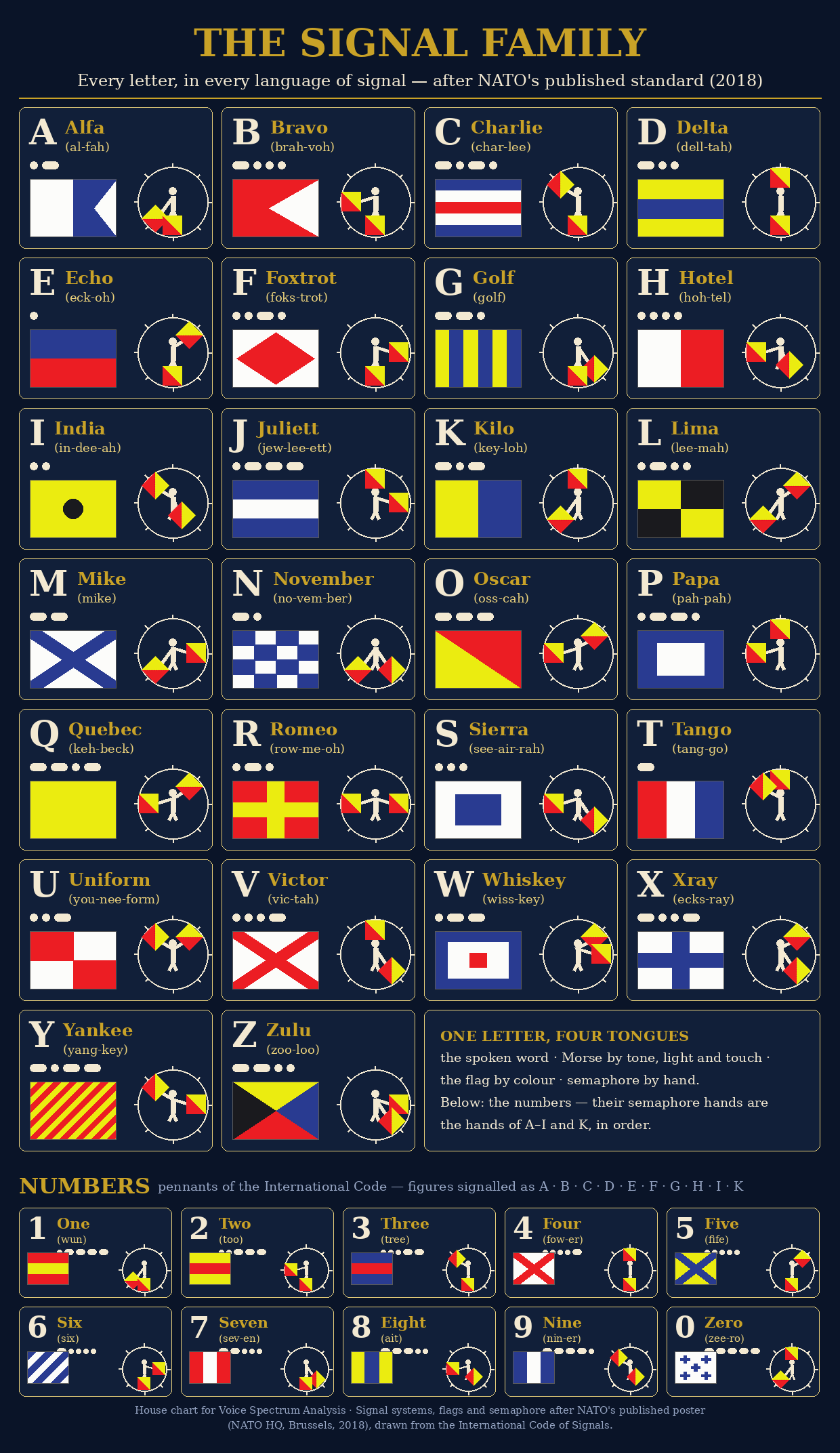
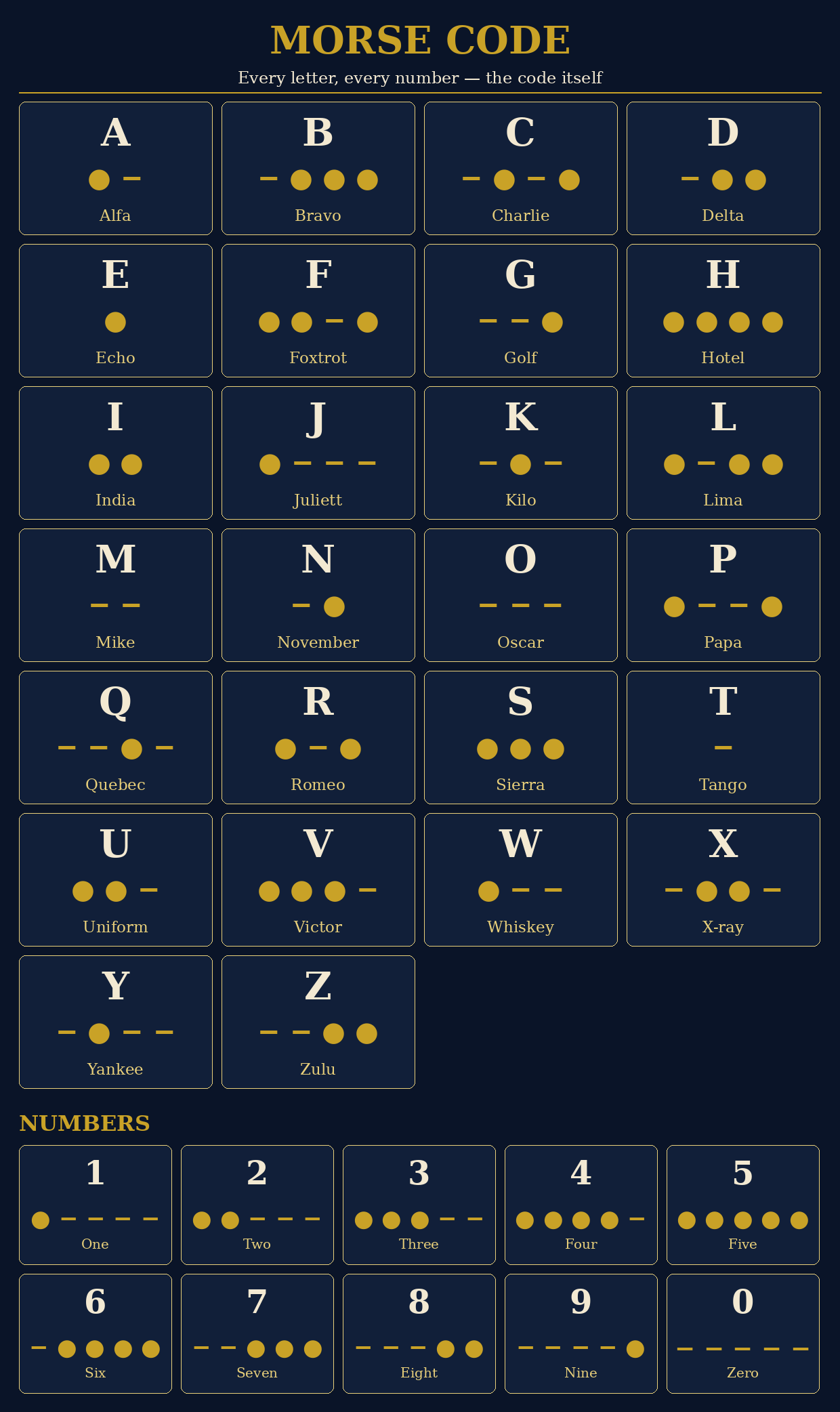
Every letter, in every language of signal — the poster, redrawn in the instrument’s colours, verified cell by cell against NATO’s standard (2018).
SIGN LANGUAGE — § —
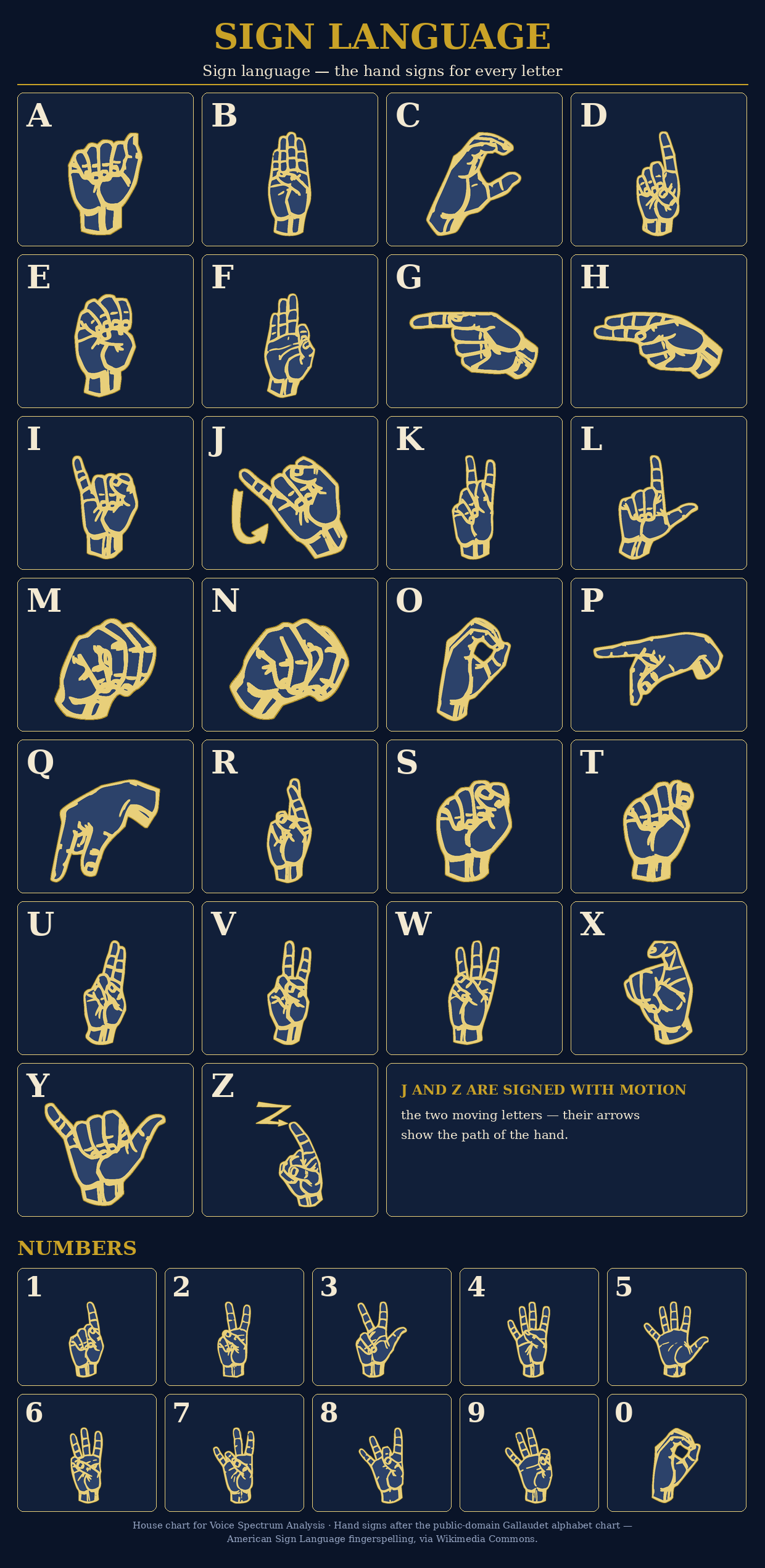
Sign language — the hand signs for every letter.
WRITE IT IN SIGN LANGUAGE
SPEED
One sign = 800 ms
THE VOICE BOX
Sing it or speak it into this box, and the hands sign your words as they come. The words it hears stand in the box — it signs what it can make out, and a sung line is harder for the hearer than a spoken one.
THE READOUT — THE WHOLE MESSAGE
Everything the signing is saying, gathered into one whole message — not letter by letter, but all together, standing in sign. However it came in — written and signed, heard in the voice box, or brought in from a file — it stands whole here, and the instrument will read it out to you.
Nothing gathered yet.
BRING IT IN — ANY FORM
A picture, a PDF, a text file — whatever form the message is in, bring it in here. What it finds stands whole in the readout above, in sign, and in the writing box, ready to sign.
These signs spell words letter by letter — the fingerspelling of the chart below. Sign language is a full language of its own; this is its alphabet, put to work.
BRAILLE — § —
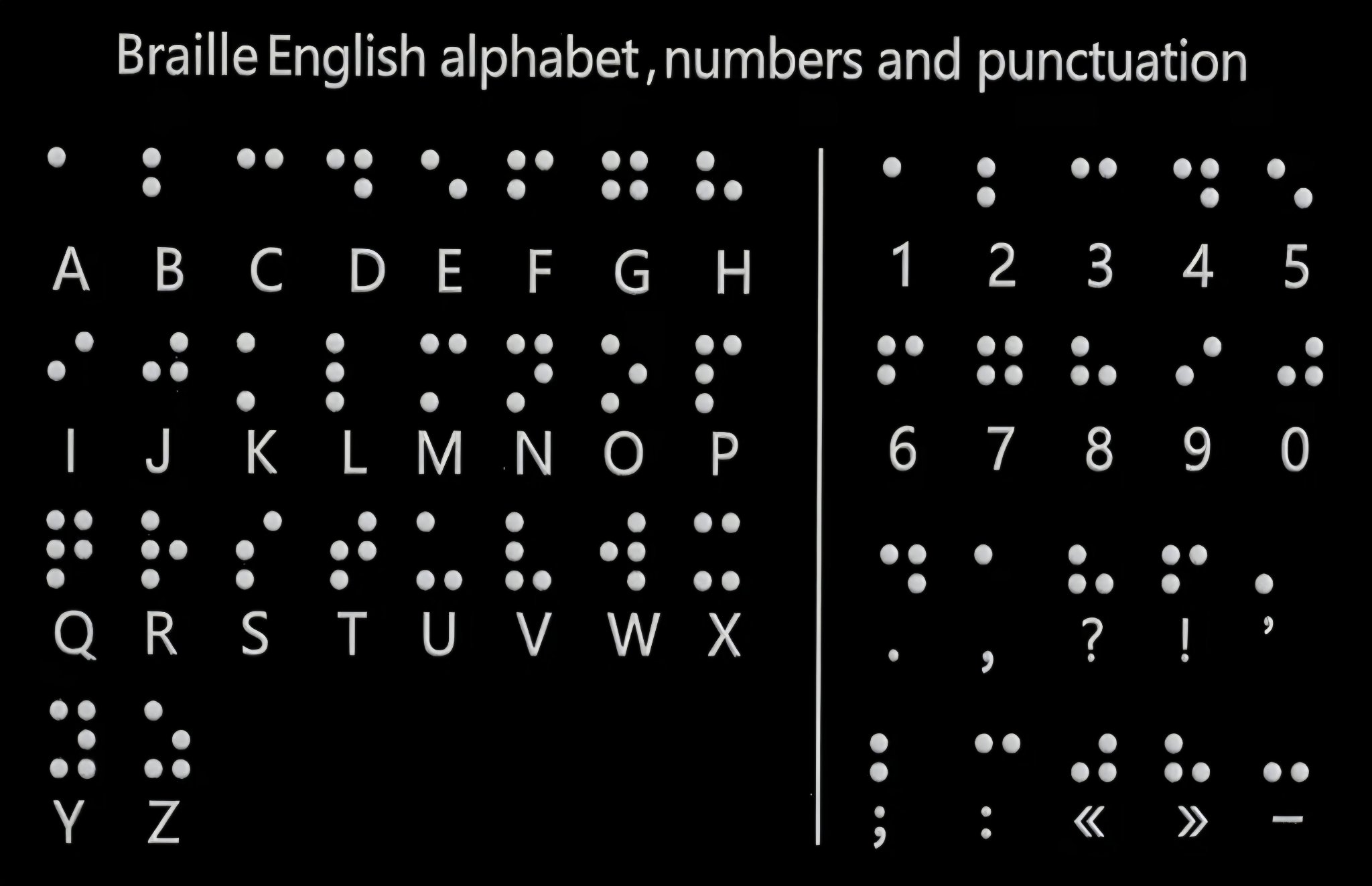
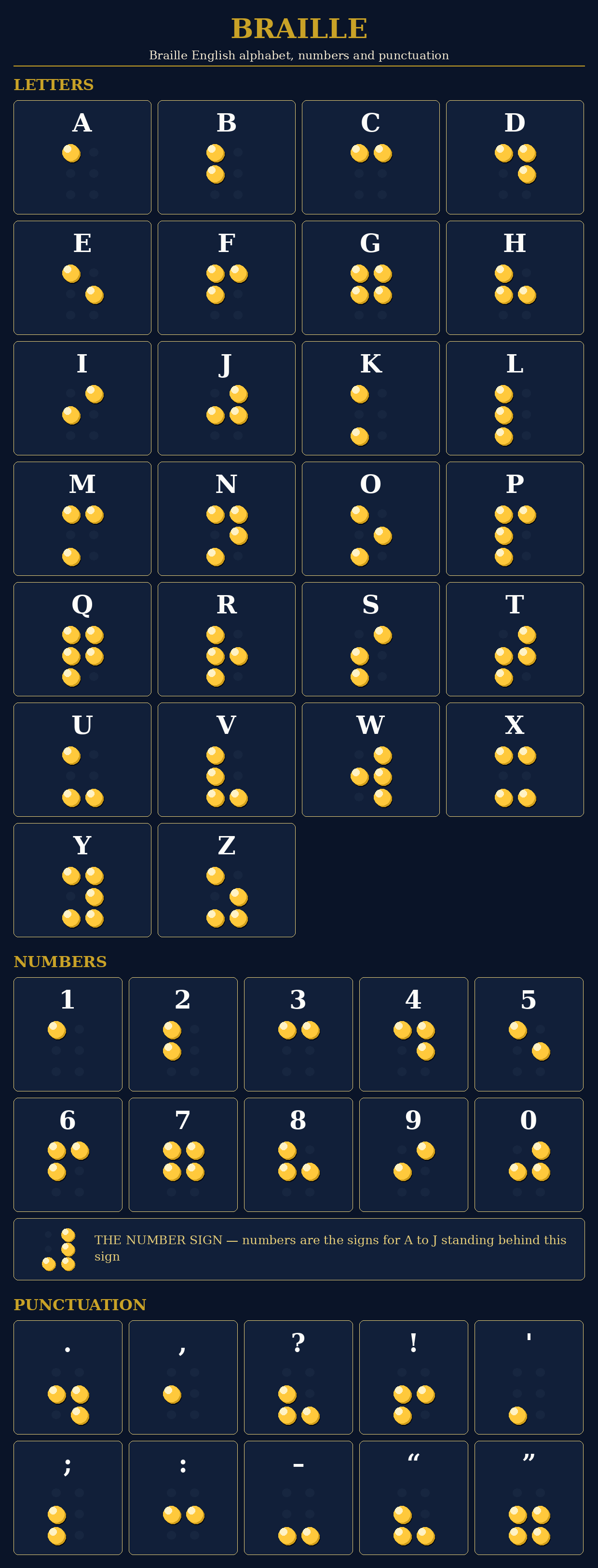
Translate physical braille into plain text or teach braille literacy using mobile devices
READ BRAILLE
Use side lighting: position a light source from the side to cast shadows on the raised dots so the software can detect them clearly.
WRITE IT IN BRAILLE
Reading Braille from a picture happens on this device. Translating into another language uses the same translation road as Language Spectral Analysis.
Clean, straight, side-lit Braille reads best. A tilted or dim photo may read rough — the text it finds stands below, so a wrong letter can be seen.
THE ORIGIN TONGUE
— § —
Psalms 46:10
WRITE IT IN ARAMAIC
Type your words — they come back written in Aramaic, and the button plays them in Aramaic. Type Aramaic — it comes back written and spoken in your language.
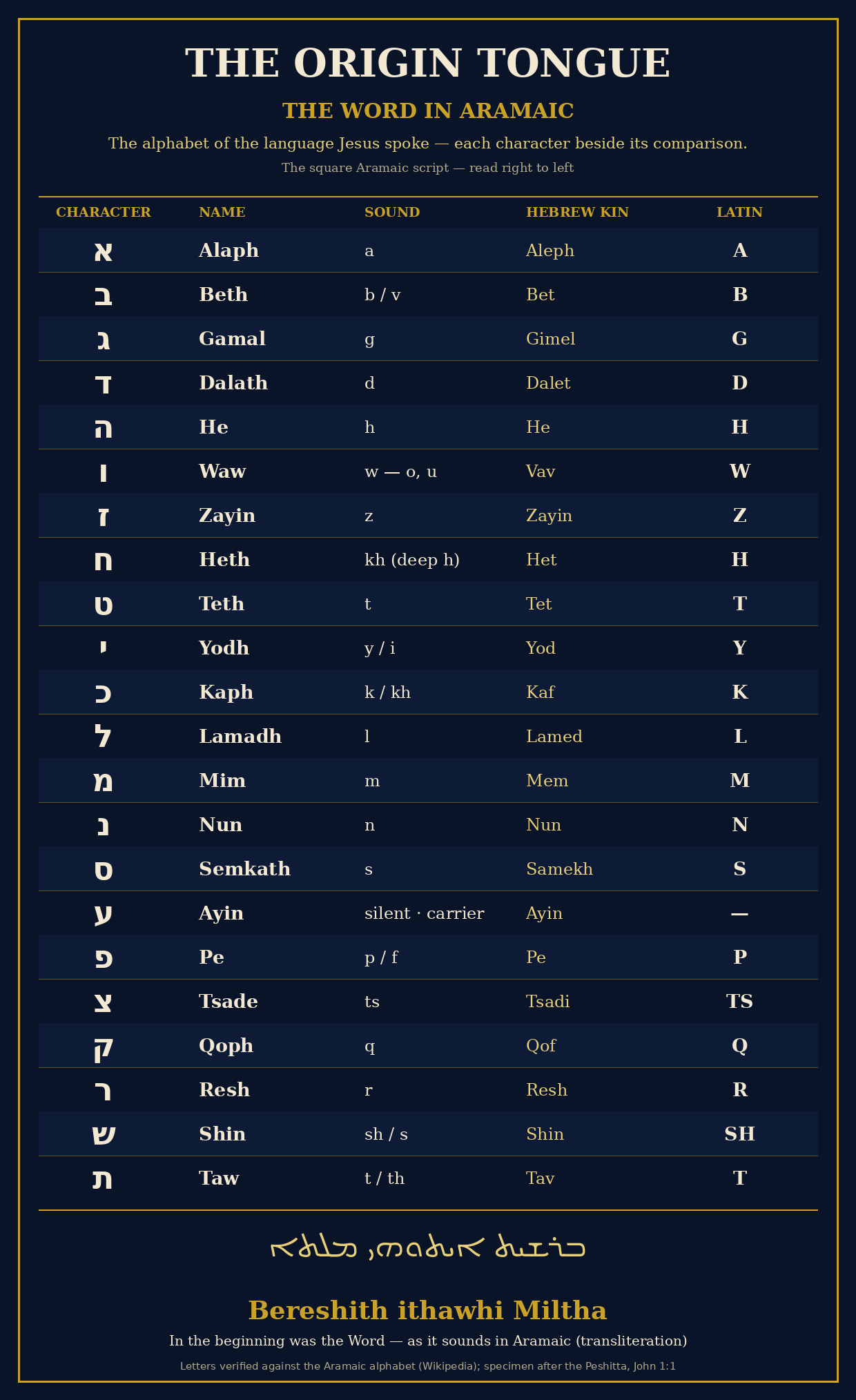
This converter writes letter for letter from the verified alphabet above — it spells words in Aramaic letters; it does not translate their meaning. The ancient script writes the consonants: A rides on Alaph, I on Yodh, O and U on Waw, and E is not written, as the old letters did not write it. When it plays, it speaks the letters’ sounds spelled out in your language — a true Aramaic voice does not exist on any phone yet. It grows here, reading by reading.
PRACTICE — LEARN IT HERE
The first line, word by word. Tap a word: see it in Aramaic, hear it played, and spell it letter by letter.
EVERY LETTER — TAP IT, HEAR IT
Tap any letter: see it large, and hear its name and its sound.
“In the beginning was the Word, and the Word was with God, and the Word was God.”
JOHN 1:1
ALL GLORY BE TO GOD
How this works, plainly: listening uses your browser’s speech service — in Chrome,
your speech is processed online to become text. Translation is provided by the free MyMemory
service, which has daily limits. The spoken playback uses voices that live on your device.
This is the translation sister. The healing instrument is VSA.
© Jelkal (Angela Hodge) — Language Spectral Analysis (LSA). All rights reserved.
MORSE CODE — § —
Speak it in, or type it in — it comes back in Morse: written out, and sent by light.
Write your words, or speak them, and the instrument sends them back in Morse code — the oldest electric language of signal. Pick any letter in the grid below to see that letter alone, sent by light.
THE READOUT — THE WHOLE MESSAGE
Everything the Morse is saying, gathered into one whole message — not letter by letter, but all together, as it reads. However it came in — typed, spoken, or brought in from a file — it stands whole here, and the instrument will read it out to you.
Nothing gathered yet.
BRING IT IN — ANY FORM
A picture of Morse, a PDF, a text file — whatever form the message is in, bring it in here. Pictures are read by the instrument's own Morse reader, here on this device. What it finds stands whole in the readout above, and in the writing box, ready to send.
SPEED
One dot = 90 ms
TAP IT IN
Tap the key for a dot, hold it for a dash. Pause, and the letter is read; pause longer, and a new word begins.
EVERY LETTER, EVERY NUMBER
Tap any box to send that one letter by light.
READ MORSE FROM A PICTURE
Clean, straight Morse reads best. A tilted or dim photo may read rough — the words it finds stand below, so a wrong letter can be seen.
Distance signals
Over the centuries, humans have come up with various methods that could be used over some distance. Native Americans reportedly used smoke signals, those from other cultures made similar use of signal fires, but such efforts were very limited in terms of extent and complexity of message. Others used bells, whistles, horns and a variety of other "noise makers", with similar limitations. At some point, written messages carried by runners, horsemen and pigeons began to be used and improved the quality of communication.
A ham operator's account of Morse
Before around ww-1 there were 2 kinds of morse code, us and international with some marked differences. International morse code is used nowadays exclusively, although I am curious te know whether any hams experiment with us morse code.
The first morse code operators, working for railway companies, used only numbers that were looked up in a code book. Letters in morse code were added later.
Some of these numbercodes still survive among ham cw operators (like me). The well known "73" for "bye" (at the close of a qso (contact)) and "88" for "love and kisses" are 2 examples of this. chracters if a cw ham contact are usually two dots, like two "e"s, but too widely spaced to be recorgnised as letters.
Morse code is very much alive, just tune into the lower ends of the shortwave ham bands . A contact in cw is very often possible when, due to weak signals, interference or noise, an ssb (speech) contact would be impossible.
THE SIGNAL FAMILY — § —
Every letter, in every language of signal — the poster, redrawn in the instrument’s colours, verified cell by cell against NATO’s standard (2018).
SIGN LANGUAGE — § —
Sign language — the hand signs for every letter.
WRITE IT IN SIGN LANGUAGE
SPEED
One sign = 800 ms
THE VOICE BOX
Sing it or speak it into this box, and the hands sign your words as they come. The words it hears stand in the box — it signs what it can make out, and a sung line is harder for the hearer than a spoken one.
THE READOUT — THE WHOLE MESSAGE
Everything the signing is saying, gathered into one whole message — not letter by letter, but all together, standing in sign. However it came in — written and signed, heard in the voice box, or brought in from a file — it stands whole here, and the instrument will read it out to you.
Nothing gathered yet.
BRING IT IN — ANY FORM
A picture, a PDF, a text file — whatever form the message is in, bring it in here. What it finds stands whole in the readout above, in sign, and in the writing box, ready to sign.
These signs spell words letter by letter — the fingerspelling of the chart below. Sign language is a full language of its own; this is its alphabet, put to work.
BRAILLE — § —
Translate physical braille into plain text or teach braille literacy using mobile devices
READ BRAILLE
Use side lighting: position a light source from the side to cast shadows on the raised dots so the software can detect them clearly.
WRITE IT IN BRAILLE
Reading Braille from a picture happens on this device. Translating into another language uses the same translation road as Language Spectral Analysis.
Clean, straight, side-lit Braille reads best. A tilted or dim photo may read rough — the text it finds stands below, so a wrong letter can be seen.
THE ORIGIN TONGUE — § —
WRITE IT IN ARAMAIC
Type your words — they come back written in Aramaic, and the button plays them in Aramaic. Type Aramaic — it comes back written and spoken in your language.
This converter writes letter for letter from the verified alphabet above — it spells words in Aramaic letters; it does not translate their meaning. The ancient script writes the consonants: A rides on Alaph, I on Yodh, O and U on Waw, and E is not written, as the old letters did not write it. When it plays, it speaks the letters’ sounds spelled out in your language — a true Aramaic voice does not exist on any phone yet. It grows here, reading by reading.
PRACTICE — LEARN IT HERE
The first line, word by word. Tap a word: see it in Aramaic, hear it played, and spell it letter by letter.
EVERY LETTER — TAP IT, HEAR IT
Tap any letter: see it large, and hear its name and its sound.